1 of 3
Certified & tested 40-point inspection
30-day returns No questions asked
1-year warranty On every device
Free shipping On orders over $50

Not “used.” Renewed with a process you can trust.

  1. Step 1: Full inspection

    Chassis, screen, ports and internals checked.

  2. Step 2: Secure data wipe

    Wiped, then a clean Windows 11 Pro install.

  3. Step 3: Full diagnostics

    Battery, memory, storage and every port tested.

  4. Step 4: Honest grading

    Excellent, Very Good or Good — clearly labelled.

  5. Step 5: Final check

    Cleaned, re-checked and warranty registered.

Grade Explained

Tap a grade to see what it means.

  • New-like condition with no visible signs of wear
  • May have been opened for inspection, configuration, or a customer return
  • Includes all original components and packaging
Open Box grade refurbished laptop – example condition

Smarter for the planet

Keep capable computers in use—and out of the waste stream.

Refurbished technology extends product life and reduces the need to manufacture a brand-new device for every upgrade cycle.

2,814devices recirculated*
100%tested inventory
1 more lifefor quality hardware

Royal Tech for business

Deploy 5 or 500. Stay on budget.

Standardized fleets, bulk configurations and consistent grading for teams, schools and organizations.

  • Volume pricing & quote support
  • Consistent model configurations
  • Asset tagging & deployment options
Request a business quote

What customers say on Google

Rated 4.9 by 940 customers across the GTA.

Sophia Rouleau Shahid Google review

AMAZING service! The staff are friendly, talented, and refreshingly honest. Delivery was fast, prices were great, and the entire experience was seamless.

Pixy Google review

5 stars, twice in a row! Last year you sold us a MacBook we loved. This year you earned our loyalty for life.

Asma Mohamed Google review

Their prices are very reasonable, and the staff are friendly and really know what they are doing. They fixed my keyboard perfectly.

Shafici Abdi Roble Google review

It is a good place if you have a broken phone or computer. They will fix it for you at a low price.

Rodolfo Martinez Google review

The staff at this establishment provide good service.

Industry knowledge centre

Latest from the Royal Tech Blog

Straight answers from the team that tests every laptop and desktop we sell.

Buying guide5 min read

Refurbished vs used laptops: what "certified refurbished" really means

Used and refurbished are not the same thing. Here is what a certified refurbished laptop goes through before it is sold, and what to check before you buy one anywhere.
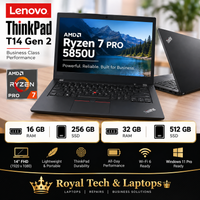
Buying guide5 min read

Refurbished vs used laptops: what "certified refurbished" really means

If you are shopping for a laptop in Toronto on a budget, you will see three words used almost interchangeably: used, refurbished and certified refurbished. They are not the same, and the difference decides whether you are buying a dependable machine or somebody else's problem.

Used: sold as-is

A used laptop is sold in whatever state the last owner left it. Nobody has necessarily checked the battery, wiped the drive properly or tested the ports. Sometimes that works out. Often the battery is tired, the keyboard has a sticky key, or the previous owner's accounts are still on it.

Refurbished: inspected and fixed

A refurbished laptop has been inspected, cleaned and repaired where needed. Faulty parts are replaced, the storage is wiped and a fresh operating system is installed. The quality of that work varies a lot from seller to seller, which is why the next word matters.

Certified refurbished: tested to a written standard

"Certified" should mean the device passed a defined checklist, was graded honestly and comes with a warranty. At Royal Tech & Laptops every certified refurbished laptop and desktop goes through the same 40-point inspection:

  • Screen, keyboard, trackpad, ports, speakers, webcam and Wi-Fi tested
  • Battery health measured, not guessed
  • Storage securely wiped and a clean copy of Windows 11 Pro or macOS installed
  • Graded Excellent, Very Good or Good on cosmetic condition only
  • Covered by a 12-month warranty, with 30-day returns

What the grade actually tells you

Grades describe how the laptop looks, not how it works. An Excellent-grade and a Good-grade ThinkPad pass exactly the same functional tests; the Good one simply has more visible marks and costs less. If the laptop is going in a bag every day, a Very Good or Good grade is often the smartest buy.

Five checks before you buy refurbished anywhere

  • Is there a written warranty, and how long is it?
  • Can you return it if it is not what you expected?
  • Is the battery health stated?
  • Is the operating system genuine and freshly installed?
  • Does the seller explain its grading?

If the answer to any of these is "no", you are closer to buying used than refurbished. Browse our certified refurbished laptops or read the warranty details to see exactly what is covered.

Shop certified refurbished laptops

Buying guide5 min read

ThinkPad, EliteBook or Latitude? Choosing a refurbished business laptop

Business laptops are built to last longer than consumer models, which makes them the best value on the refurbished market. Here is how the three big lines compare.

Buying guide5 min read

ThinkPad, EliteBook or Latitude? Choosing a refurbished business laptop

Most of the refurbished laptops worth buying started life as business laptops. Companies lease them for a few years, then replace the whole fleet, even though the machines have plenty of life left. They are built with stronger hinges, better keyboards and easier repairs than consumer laptops, which is exactly what you want in a second-hand machine.

Lenovo ThinkPad: the keyboard people keep coming back for

ThinkPads such as the T14 Gen 2 and the T490 are known for their keyboards, durability and easy repairs. The AMD Ryzen 7 Pro versions are especially strong for multitasking, with eight cores in a 14" laptop. A refurbished ThinkPad is a safe choice for students, remote workers and anyone who types all day.

HP EliteBook: slim and well-built

The EliteBook line, including the EliteBook 840 G7, feels premium for the price, with an aluminium or magnesium body, a bright anti-glare screen and good speakers. It suits people who carry their laptop between meetings and want something that still looks sharp.

Dell Latitude: the dependable all-rounder

Latitudes are the workhorses of many Canadian offices. They are easy to service, parts are widely available, and the 14" models strike a good balance between screen size and weight.

What specs to look for in 2026

  • Processor: Intel Core i5 10th Gen or newer, or AMD Ryzen 5 / Ryzen 7 Pro, for smooth Windows 11 use
  • Memory: 16GB RAM is the sweet spot; 8GB is fine for browsing and documents
  • Storage: an SSD is essential; 256GB suits most people, 512GB if you keep a lot of files locally
  • Screen: 14" Full HD (1920×1080) is the most comfortable everyday size

Buying for a team or a school?

If you need several identical machines, ask about bulk and business pricing. Matching laptops make setup, support and spare parts much simpler, and we can prepare them before they leave our Etobicoke shop.

Browse business laptops

Repair4 min read

Laptop not charging? 6 checks before you pay for a repair

A laptop that will not charge is one of the most common problems we see at our Etobicoke repair counter, and it is not always the battery. Try these checks first.

Repair4 min read

Laptop not charging? 6 checks before you pay for a repair

A laptop that suddenly stops charging is stressful, especially the day before a deadline. The good news: the cause is often simple. Work through these checks before you book a repair.

1. Try a different outlet and power bar

Plug the charger straight into a wall outlet you know works. Power bars and surge protectors fail more often than people think.

2. Inspect the charger and cable

Look for kinks, frayed sections or a bent tip, and check whether the light on the charger (if it has one) turns on. If you can, borrow a compatible charger with the correct wattage. A failing charger is the cheapest fix of all.

3. Check the charging port

Shine a light into the port. Dust and lint get packed in over time and stop the connector seating properly. If the plug feels loose or only charges at a certain angle, the port itself may be damaged.

4. Restart and check the battery status

Shut the laptop down fully, wait a minute and start it again with the charger connected. In Windows, the battery icon should say "Plugged in, charging". "Plugged in, not charging" usually points to a worn battery or a battery setting.

5. Look at battery health

Batteries wear out. Most laptops can create a battery report that shows how much capacity is left. If it is well below the original, a replacement battery will usually bring the laptop back to all-day use.

6. Update drivers and BIOS

Occasionally a power-management driver or BIOS bug stops charging. Check the manufacturer's support site for updates for your exact model.

Still not charging?

Bring it to our shop at 38-A Rexdale Blvd in Etobicoke or book a laptop repair online. We will tell you what is wrong and quote before any work starts. If the repair does not make sense for an older machine, we can offer a trade-in toward a certified refurbished laptop instead.

Book a laptop repair